
Ask Your Data Anything Where You Already Work
Ask questions in Slack and get reports, charts, and analysis directly in the thread from the same live event data.

Keep the Analysis in the Conversation
Mention @KeewanoAsk in a channel and ask a question in plain language. It queries the live event record, replies in the thread, and keeps the context as the conversation continues.


✨ Question
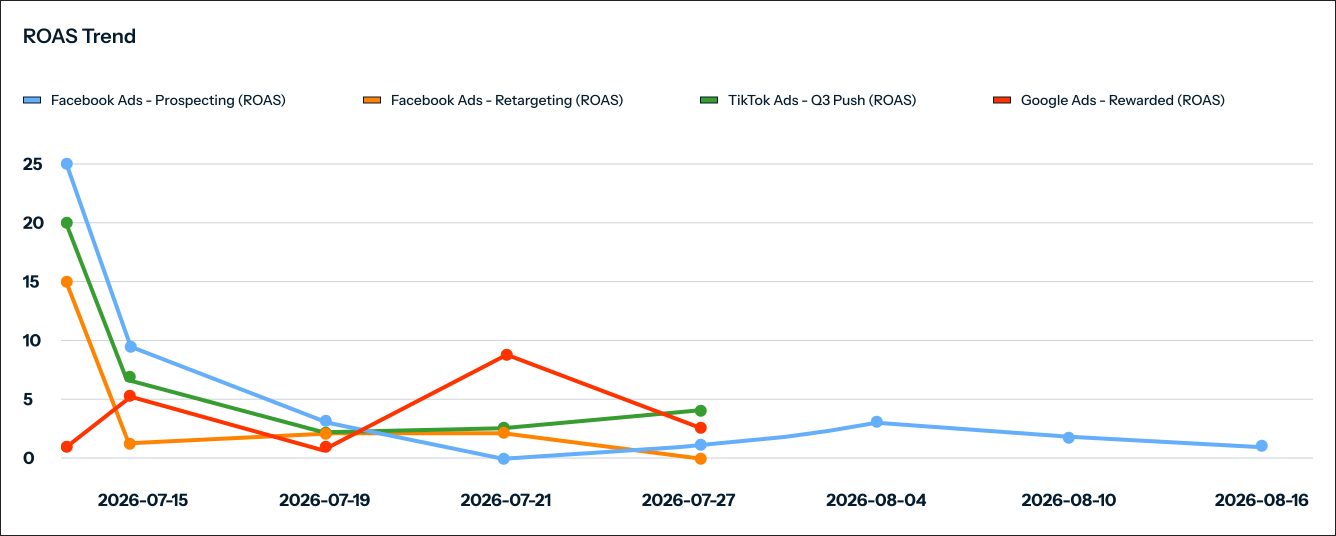
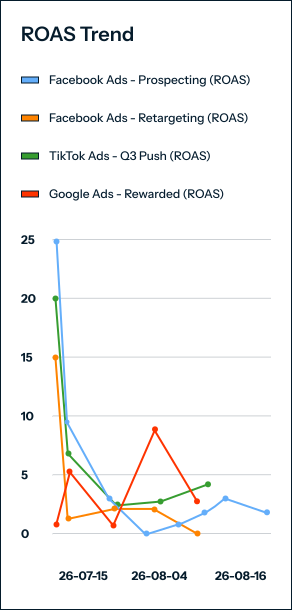
Build ROAS cohort by day, by marketing install campaign

✨ Answer Time period: 2026-07-15 to 2026-08-17 - Filters: Cohort registrations monitored between 2026-07-15 and 2026-08-17
- Launch Day Peaks: On 2026-07-15, Facebook Ads - Retargeting reached 24.91x ROAS, TikTok Ads - Q3 Push achieved 16.84x, and Facebook Ads - Prospecting hit 7.66x.
- Stabilized Performance: Facebook Ads - Prospecting stabilized between 0.5x and 1.7x ROAS, while Google Ads - Rewarded peaked at 6.28x on 2026-07-24.
- Active Cohorts: The 2026-08-17 cohort is currently in progress, showing an expected low initial ROAS (0.01x) that will increase as player lifetime matures.

Ask for Any Analysis

From Answer to Action
Send answers and alerts to a Slack channel, deliver them by email, or trigger another system through a webhook.
Every result stays connected to the event data behind it.
The Same Analytics Everywhere
Keewano Ask for Slack uses the same event record, semantic definitions, and analytics capabilities as:
A question can begin in Slack and continue through the interface that fits the next step.
Shared Access and Permissions
Slack requests follow the access rules defined in Keewano Analytics.
Users receive answers only from the projects and data they are permitted to access.
Queries and activity remain visible through the platform’s audit records.
Analyze With Keewano Analytics
Ask new questions, compare patterns across millions of entities, and bring live analytics into the channels where your team already works.